

Description
Download SeeMovie – Search by Picture, Movie Seeds, Video Search
SeeMovie is a desktop utility designed to streamline movie discovery by enabling image-based searches for film-related torrent seeds. It allows users to instantly locate downloadable content by uploading a movie poster or screenshot, eliminating the need to manually search across multiple platforms. This tool is ideal for film enthusiasts who frequently browse platforms like Douban or Baidu Tieba, where visual content is often shared without accompanying download links. By integrating directly into the browsing experience, SeeMovie reduces friction in accessing desired films, particularly when users encounter appealing visuals but no direct resource links. The software is tailored for casual viewers and media collectors who value efficiency and convenience in content acquisition. Its core functionality focuses on enhancing the user's ability to quickly transition from visual inspiration to immediate playback. Future updates are expected to expand capabilities to include facial recognition-based searches, potentially broadening its application beyond standard posters. The developer did not provide additional details about the software’s technical architecture or underlying algorithms.
Key Features & Capabilities
- Image-Based Movie Search – Upload a movie poster or screenshot to initiate a search for related torrent seeds. This feature enables users to find downloadable content directly from visual cues, reducing reliance on keyword-based queries.
- Browser Integration – Seamlessly works within web browsers, allowing users to trigger searches directly from platforms like Douban or Baidu Tieba with a single click.
- Instant Resource Retrieval – Upon identifying a match, the software displays relevant torrent links, enabling immediate playback or download without switching between websites.
- Optimized for Movie Posters – Currently performs best with high-quality movie posters, ensuring accurate matching and faster results.
- Future Facial Recognition Support – Upcoming versions will introduce facial recognition technology to identify characters in screenshots and locate related films, expanding the tool’s utility beyond traditional poster searches.
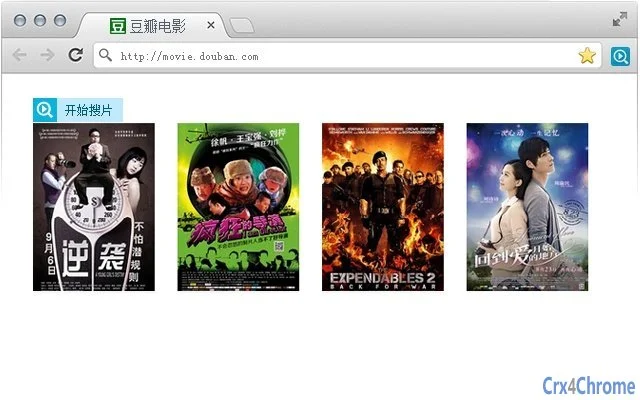
The software is particularly useful in scenarios where users encounter visually appealing film content but lack direct download links. For example, a user browsing a Douban movie page can hover over a poster, click the SeeMovie button, and instantly access available seeds. Similarly, on Baidu Tieba, where users often post screenshots without sharing torrents, SeeMovie allows viewers to retrieve resources directly from the image, turning passive viewing into active content acquisition. These use cases highlight the software’s role in bridging the gap between visual inspiration and digital access.
User Interface, Workflow & Performance
The user interface is designed for minimalism and efficiency, focusing on a single core function: image upload and search initiation. The interface appears as a browser extension or standalone tool, with a clear button labeled “SeeMovie” that activates when hovering over a movie image. Navigation is straightforward, requiring only a mouse click to trigger the search process. The workflow is streamlined to reduce user effort—users do not need to copy image URLs or manually paste them into external tools. The software processes the image and returns results in a dedicated panel, typically within seconds. Performance observations are based on general software behavior patterns. The developer did not specify resource usage details, so CPU and RAM behavior remain unknown. Stability is expected to be consistent with typical desktop utilities of similar size. No reported crashes or errors were mentioned in the release notes.
Compatibility & System Requirements
SeeMovie is compatible with both Windows and Mac operating systems. The software version is 1.0.0, with a file size of 2.5 MB, indicating a lightweight installation. This small footprint suggests minimal impact on system resources. The developer did not provide additional system requirements, so exact hardware specifications such as processor speed, RAM, or disk space are not available. Compatibility information was partially provided, confirming support for desktop environments on both major platforms. No mention was made of mobile or tablet compatibility. Users should ensure their systems meet standard requirements for running desktop applications, though specific thresholds were not outlined.
Pros and Cons
Pros
- Effortless image-to-movie search functionality
- Direct integration with popular platforms like Douban and Baidu Tieba
- Fast results with minimal user input
- Lightweight at just 2.5 MB
- Future facial recognition feature promises expanded utility
Cons
- Currently limited to movie posters; may not work well with low-quality or non-poster images
- Exact performance metrics and system requirements were not specified
- Future facial recognition feature is not yet available
- No information on update frequency or long-term maintenance
- Browser extension functionality may require manual installation
FAQ Section
Is SeeMovie available for both Windows and Mac?
Yes, the software is compatible with both Windows and Mac operating systems, as confirmed by the developer.
Is SeeMovie free to use?
Yes, SeeMovie is currently offered at no cost to users.
Does SeeMovie require an internet connection?
Yes, since the software searches for movie seeds online, an active internet connection is required for full functionality.
Can I use SeeMovie offline?
No, offline usage is not supported. The tool relies on online databases to retrieve torrent seeds, so it cannot function without internet access.
What types of images work best with SeeMovie?
SeeMovie performs best with clear, high-quality movie posters. Screenshots of scenes may yield less accurate results, especially if they lack distinctive visual elements.
Final Thoughts + CTA
SeeMovie delivers a compelling solution for film lovers who frequently encounter visually appealing content without corresponding download links. Its ability to transform a simple image into a direct path to a movie torrent is both innovative and practical. The seamless integration with platforms like Douban and Baidu Tieba enhances the browsing experience, making content discovery faster and more intuitive. While the current version is optimized for movie posters, the upcoming facial recognition feature signals a promising evolution in image-based search technology. Despite the lack of detailed system requirements and performance data, the software’s lightweight design and clear purpose make it a valuable addition to any media enthusiast’s toolkit. For users who value speed, convenience, and efficiency in accessing films, SeeMovie stands out as a must-have utility. Download SeeMovie now.
Guides & Tutorials for 看图搜片 Extension for Chrome
How to install 看图搜片 Extension for Chrome
- Click the Preview / Download button above.
- Once redirected, accept the terms and click Install.
- Wait for the 看图搜片 Extension for Chrome download to finish on your device.
How to use 看图搜片 Extension for Chrome
This software is primarily used for its core features described above. Open the app after installation to explore its capabilities.
User Reviews for 看图搜片 Extension for Chrome 0
No reviews found





